
Many equipment-room asset lists have only a server name or an asset number. They do not say which cabinet it is in, which U positions it occupies, which power feed it uses, or which business department owns it. When expansion, fault location, or a security check arrives, the site can only rely on personal memory: someone remembers “it is probably in the row on the left,” someone has already changed jobs, and a new person on duty can only open doors and search cabinet by cabinet. If the asset ledger cannot be matched to a cabinet and a U position, online status on the monitoring platform is also hard to match to a specific device. In the equipment-room power and environment solution package, Guangzhou Tongwei Smart Technology Co., Ltd. (Tongwei Smart) treats the ledger as the basis on which alarms and work orders can land. An IoT connection can associate equipment online status under authorization. Industrial-grade AIoT cannot automatically generate a reliable U-position map without a site inventory, and sensitive asset information should not be published directly.
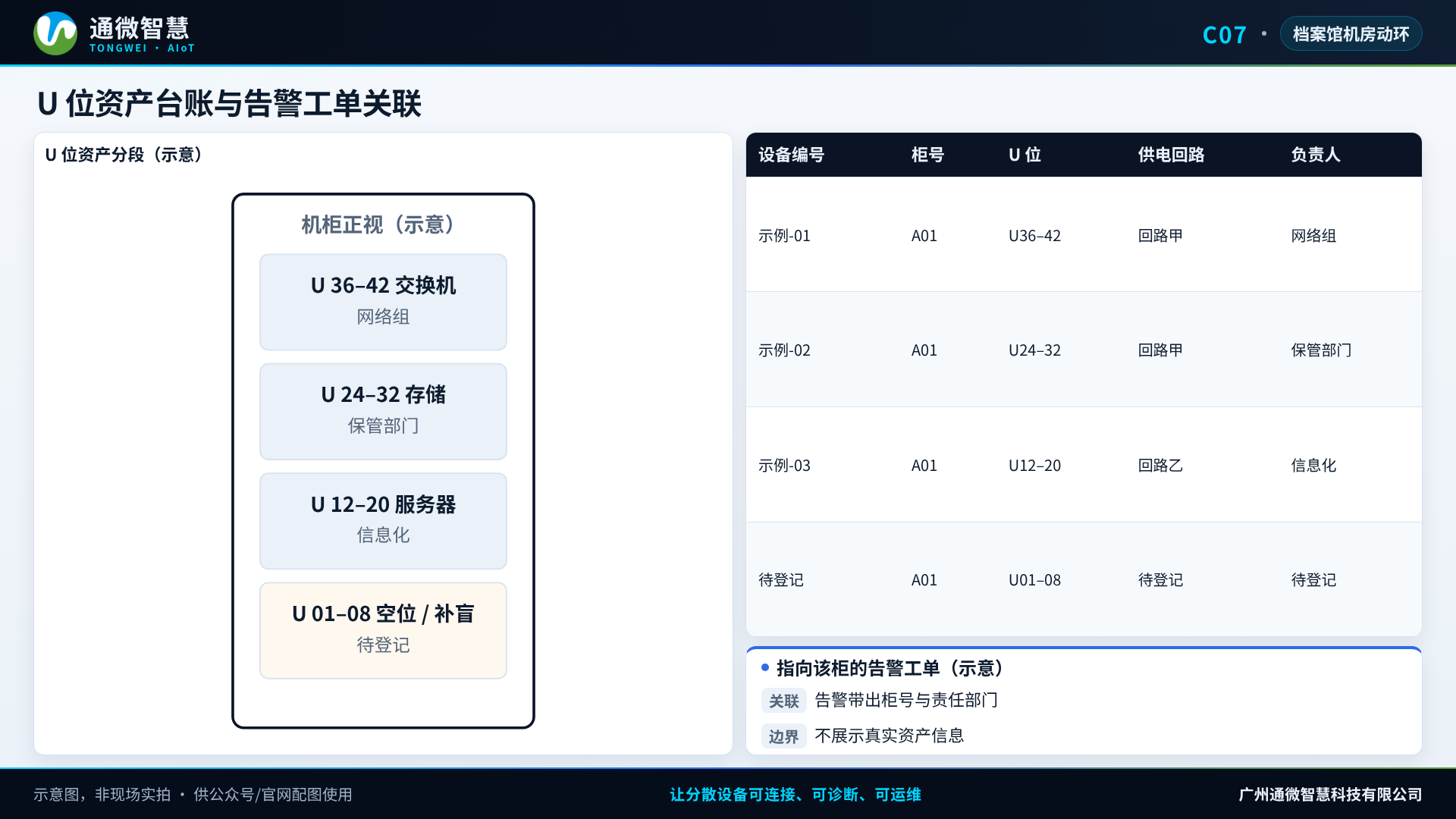
During the inventory, tie location, power, and the responsible person together with a unique ID
On site, check the equipment’s unique ID, the cabinet ID, the occupied U positions, the power circuit or PDU location, which network port it belongs to, and the business owner. Information that can safely be written into a shared ledger is graded by the organization’s permissions. Details that involve archival data or confidential systems should not appear on ordinary operations screens. The inventory is mainly checking and labeling. Do not unplug cables or interrupt the service in order to “see it clearly.”
Write the change rules at the same time: who updates the ledger for an addition, a move, a removal, or a retirement, when it is rechecked, and how a mismatch between the physical item and the record is escalated. A ledger with no update owner will, before long, return to a state of “names only, no location.”
An archives equipment room often has several lists running in parallel: the information department has an equipment list, the archival business department has a system list, and property management or the low-voltage team has another list of cabinets and power. When the three do not match, do not rush to merge them into one “master list” for external use. First agree which list is the primary ledger for locating equipment, and which fields are shared only within an authorized scope. Temporarily borrowed storage, test equipment, or a manufacturer’s commissioning machine is the easiest blind spot in the ledger. A minimum registration requirement for anything entering the equipment room should be set.
A label that has fallen off, writing that is no longer readable, or a nickname with no unique ID will also make a later monitoring association fail. Relabeling has to be done without interrupting the service, and the ledger should record the relabeling time and the person who did it. For equipment with no label, do not “align” a monitoring point to a guessed name for the time being.
The monitoring platform associates status under authorization. It does not replace the asset-management rules
After the ledger is in place in an initial form, a smart IoT gateway can associate environment, power, and equipment status that has already been connected with a cabinet or equipment ID, under authorization. When a concentrated equipment room uses an SG series rack-mount edge gateway as the aggregator, a clear cabinet-position code is needed first. Otherwise an alarm will only show a point name that is hard to find. An integrated cabinet can use the BEC series, and the equipment list inside the cabinet still has to be maintained. The association follows the ledger the owner has confirmed. The platform should not “guess” which U position a server is in.
What Tongwei Smart does at this layer is let alarms, work orders, and inspection be written down to a specific cabinet, rather than showing only an overall view of the equipment room. For example, when inlet air in a cabinet exceeds a limit, or a PDU is close to its rated value, the work order should carry the cabinet ID, the responsible person, and the related business, so the notice reaches someone who can actually handle it. AIoT reports can summarize alarms and unclosed work orders by cabinet. Whether the assets match the books still depends on periodic site sampling. It cannot be judged only by whether the platform has a record.
Notification and permissions have to follow the ledger as well. After a business department changes, or a person changes jobs, the cabinet owner has to be updated at the same time. Otherwise a graded alarm will go to someone who is no longer responsible. A failed notification also has to be detectable.
Decide in advance which ledger fields can appear on the daily operations screen, and which can be viewed only at a higher permission or in an offline file. Cabinet location and the power circuit are useful for troubleshooting, but equipment purpose, data content, and account information should not spread with the power and environment screens. Display by authorization on the platform does not mean this ledger can be exported at will to a personal mailbox or WeChat. Export, print, and handover all have to leave a record, and have to follow the organization’s information-security requirements.
Sample the ledger, labels, and the latest change. Do not stop the business to pull cabinets apart
At acceptance, randomly select several devices and compare the ledger, the physical label, and the latest change record for consistency, and check whether sensitive fields are displayed according to permission. If they do not match, record it first and have the responsible person correct it. Do not start a large rearrangement of equipment on the spot during the sample. Equipment that cannot be measured, or that has not been labeled yet, is marked as pending verification.
Sampling should be a regular action, not something done only on the project acceptance day. The sample result should name the type of mismatch: the location is wrong, the responsible person is out of date, the equipment has been removed but not written off, or the label does not match the ID. Each type of problem needs a correction deadline and a reviewer. A record whose name is right and whose location is wrong can still send someone to the wrong cabinet when an alarm occurs, so it cannot be counted as already acceptable.
Run the ledger through on one row of cabinets first
Hand the existing asset list, the cabinet plan, and the list of responsible persons that can be shared to Tongwei Smart, and first complete coding, U-position registration, alarm association, and sample checking on one row of cabinets. On equipment-room power and environment projects, Tongwei usually makes the ledger quality of this one row solid first, and then decides whether to extend it to the whole room or to connect it, under authorization, with the repository asset system. Before that connection, permissions and field scope still have to be confirmed. A complete asset list that has not been graded must not be sent directly to another system.