
Power came back before dawn, and someone in the group chat said it was already restored. The handover still has to answer three things. During the outage, did the critical load stay powered? Which battery string took part in the discharge? After the utility returned, did the battery enter recharge? Utility supply, the UPS, the battery, and the environment have to sit on one timeline before those answers line up.
Read one outage straight through on the timeline
The following is a commissioning example. The fields shown have to follow the data the equipment on site can actually provide.
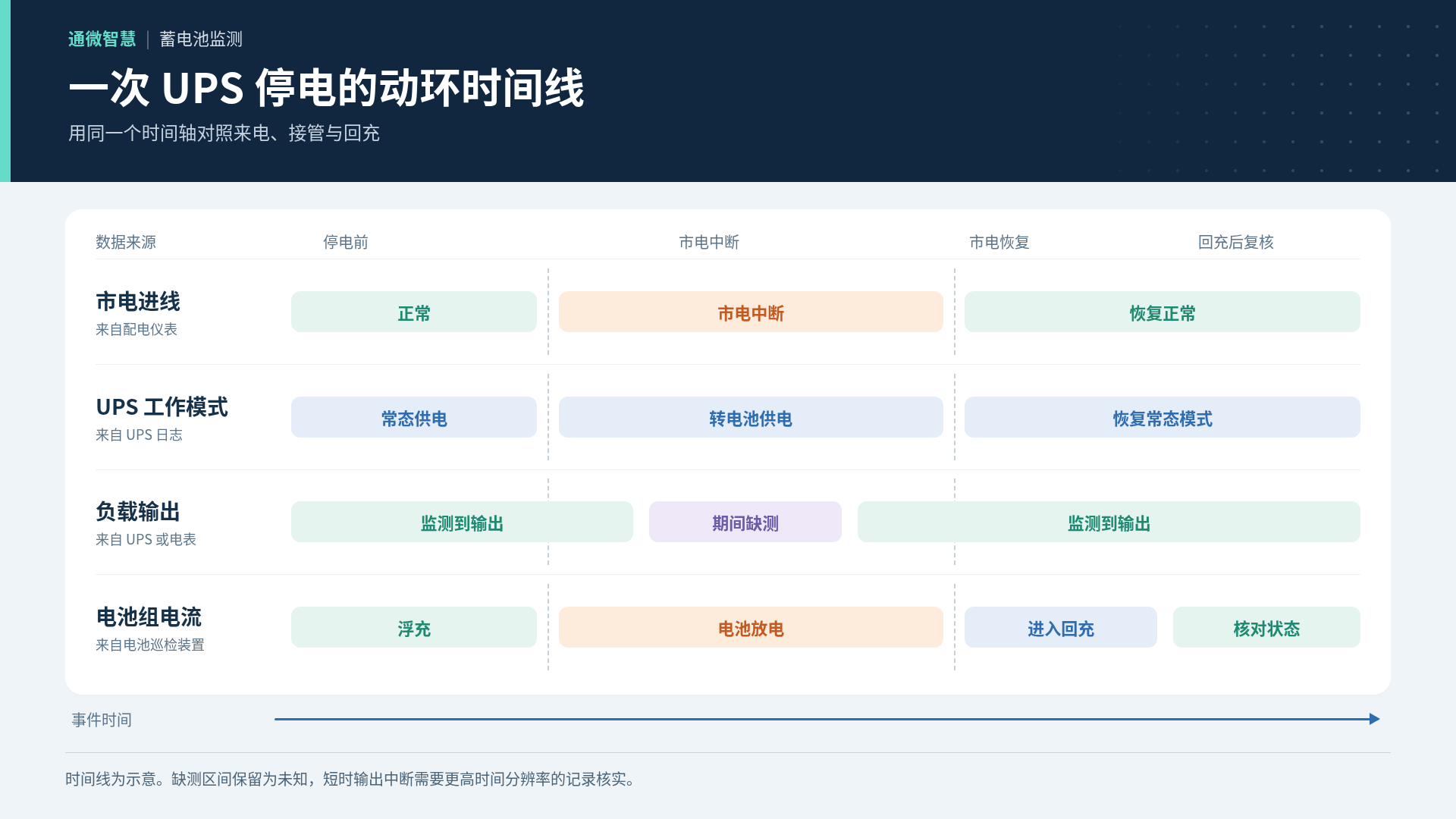
| Point on the timeline | Data to compare | What the handover should record |
|---|---|---|
| Utility interruption | Incoming feeder, UPS input, and power events | Which point the interruption was seen on, and whether it belongs to the same event |
| UPS transfer to battery | UPS operating mode, output voltage or power, direction of string current | Whether the battery took over, and whether output continued inside the monitoring window |
| Continued discharge | Output active power, string current, cell trend, ambient temperature | Whether the load changed suddenly, and which cells need a recheck |
| Utility return and recharge | Utility restoration, UPS mode, recharge current, and charge status | When normal supply returned, when the battery entered recharge, and whether the degree of recovery has been confirmed |
If the output record comes from periodic polling, it only covers that sampling window. To check a short interruption, compare the original UPS event log, a power-quality record with a suitable time resolution, and the operating log of the critical load itself. A power curve drawn by the minute says little about a transfer that happens in seconds.
Confirm the real time first, then associate the alarms
Some devices carry their own event time. Some points only have the time the gateway read them. The platform also records the time it received the data. If data is backfilled after a network break, according to the configuration, the three times can be far apart. A review should sort first by a source time that can be traced. If the source time is missing, note that the acquisition time was used. When clocks across devices do not agree, put the device log and the platform receipt record side by side. That is more reliable than forcing them onto the same second.
If the feeder interruption, the UPS transfer to battery, and the start of battery discharge happen close together, they can be associated with one supply event. The original record of each alarm still has to be kept. If there is also a local battery temperature rise during the interval, or a battery monitor drops offline, the work order should keep a separate item to investigate each one. In particular, if an acquisition gap crosses the outage, the report has to say that this stretch of data is missing. Do not use one normal reading after recovery to fill the whole interval in as having been normal the whole time.
After the utility returns, one item is still open
Most reviews can be handed over at three points: supply restored, recharge entered, and standby status checked. After the utility returns, how large the recharge current is, how long it takes to reach the state the equipment specifies, and whether a staged alarm is still present, depend on the equipment record and on a maintenance judgement. The platform records only a status that already has evidence. A field that cannot be matched yet goes on the list to be checked.
Tongwei Smart can connect an existing point list to the platform, string the alarms together by time, and pass both the facts that have been confirmed and the items not yet checked to the next shift. Where conditions allow, take one historical UPS log and the curve from the same interval for an offline replay, and see whether the start and end of the event, the data source, the unconfirmed questions, and the responsible person can be handed over clearly.